> ## Documentation Index
> Fetch the complete documentation index at: https://docs.ownid.com/llms.txt
> Use this file to discover all available pages before exploring further.
# Authentication Providers
> Learn how to manage sessions, events, and different authentication options
OwnID Elite provides a powerful and flexible framework for integrating and customizing authentication processes within your applications. By leveraging `Providers` and `Events`, developers can implement or override specific aspects of the authentication flow, tailoring the user experience to meet the unique needs of their applications.
* **Providers:** These manage critical components such as session handling and authentication mechanisms, including traditional password-based sign-ins. They allow developers to define how users are authenticated, how sessions are maintained, and how accounts are managed within the application.
* **Events:** These handle specific actions and responses within the authentication flow. They allow developers to customize behaviors when certain events occur, such as when the authentication process finishes, when an error is encountered, or when the flow detects a new user and prompts for registration.
All Events and Provider handlers are optional!
# Providers
### Session
The Session Provider is responsible for creating and managing user sessions. In this implementation, use the `create` method to create a user session utilizing the `data.token` returned from your backend, and return a status indicating whether the session creation was successful or not.
```javascript theme={null}
const providers = {
session: {
create: async (data: any) => {
try {
// implement your own method to set a session in the frontend
await this.authService.onLogin(data.token);
return { status: 'logged-in' };
} catch (error) {
console.error(error);
return { status: 'fail', reason: 'Failed to create session' };
}
},
}
};
window.ownid('start', { providers });
```
### Authentication
Use Authentication to implement your own **password login** handler
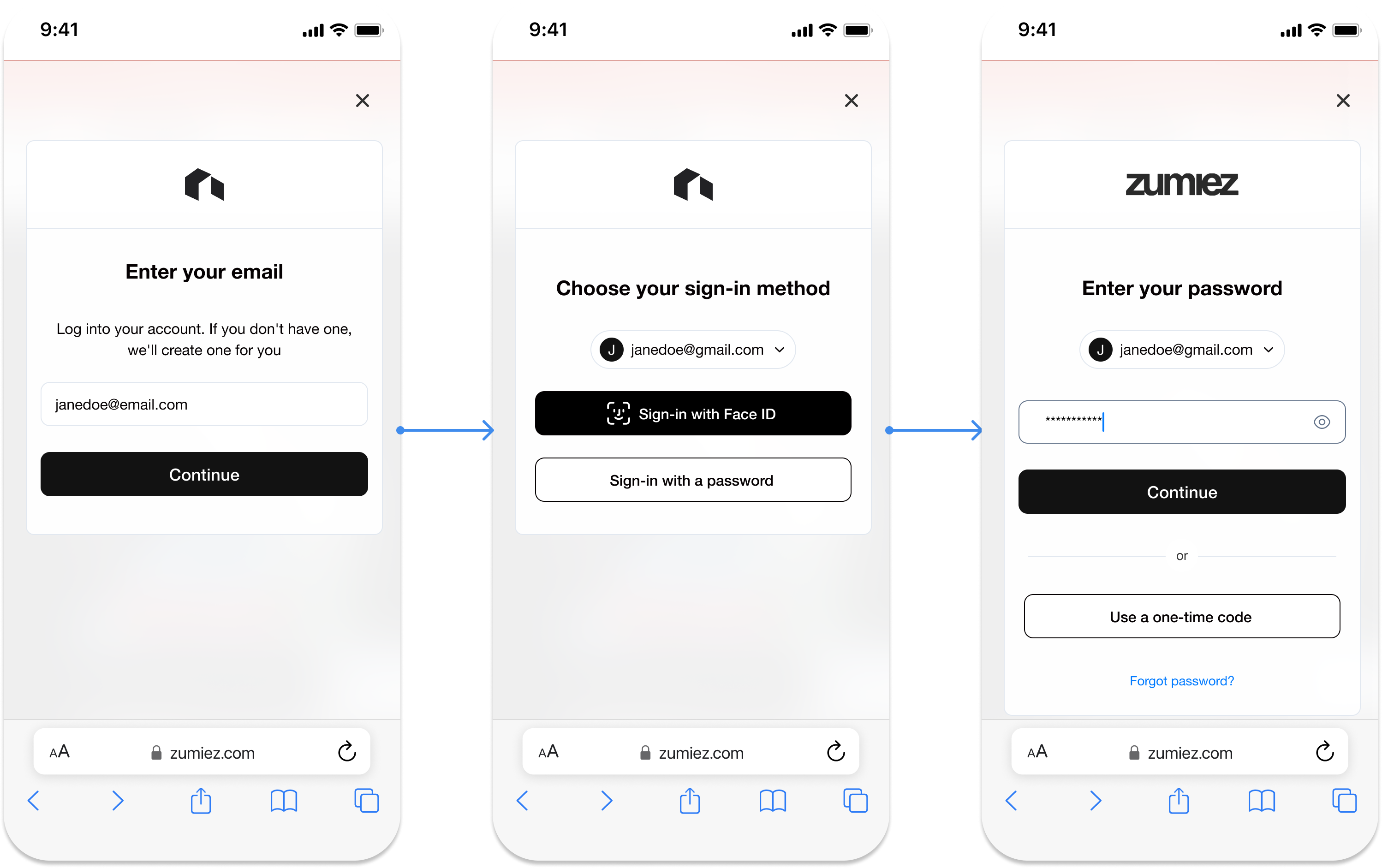 Figure 1. Password Authentication Experience (example)
The Auth Provider manages authentication mechanisms, such as password authentication. In this example, the `authenticate` method validates the user's credentials, and the `reset` method handles password reset requests.
```javascript theme={null}
const providers = {
auth: {
password: {
authenticate: async (params: any) => {
try {
// call your own password login method
await this.authService.login({ email: params.loginId, password: params.password });
return { status: 'logged-in' };
} catch {
return { status: 'fail', reason: 'Please enter a valid password' };
}
},
reset: () => ({ action: 'redirect', url: '../reset-password' }),
},
}
};
window.ownid('start', { providers });
```
**Explanation**
* `authenticate`: This method attempts to log in the user using the provided loginId and password. If successful, it returns status: 'logged-in'. If authentication fails, it returns status: 'fail' with a reason such as "Please enter a valid password."
* `reset`: This method handles the reset of user passwords. In this example, it redirects the user to a specific URL where they can manage password recovery.
# Events
### onFinish
The `onFinish` event is triggered when the authentication flow is successfully completed. This event allows you to define actions that should be taken once the user is authenticated, such as redirecting the user to a specific page.
```javascript theme={null}
const events = {
onFinish: async () => ({ action: 'redirect', url: "/my-account" }),
};
window.ownid('start', { events });
```
### onAccountNotFound
Use `onAccountNotFound` to use your **own registration** flows
The `onAccountNotFound` event is triggered when the provided account details do not match any existing accounts. This event allows you to handle scenarios where a user needs to be registered or redirected to a registration page.
```javascript theme={null}
const events = {
onAccountNotFound: async (params) => {
//params.loginId contains the user email, in case you want to use it
return { action: 'redirect', url: "/create-account" };
},
};
window.ownid('start', { events });
```
### onClose
The `onClose` event is triggered when the authentication flow is closed, either by user action or automatically. This event allows developers to define what should happen when the authentication flow is interrupted or completed without a successful login.
```javascript theme={null}
const events = {
onClose: async () => {
return { action: 'refresh' }; // Refresh the current page
},
};
window.ownid('start', { events });
```
### onError
The `onError` event is triggered when an error occurs during the authentication flow. This event allows developers to handle errors gracefully, such as by logging them or displaying error messages to the user.
```javascript theme={null}
const events = {
onError: async (error: any) => {
// Additional error handling logic can be implemented here
},
};
window.ownid('start', { events });
```
# Complete Code Example
```javascript theme={null}
const providers = {
session: {
create: async (data: any) => {
try {
await this.authService.onLogin(data);
return { status: 'logged-in' };
} catch (error) {
console.error(error);
return { status: 'fail', reason: 'Failed to create session' };
}
},
},
auth: {
password: {
authenticate: async (params: any) => {
try {
await this.authService.login({ email: params.loginId, password: params.password });
return { status: 'logged-in' };
} catch {
return { status: 'fail', reason: 'Please enter a valid password' };
}
},
reset: () => ({ action: 'redirect', url: '../reset-password' }),
},
},
};
const events = {
onFinish: async () => ({ action: 'redirect', url: pathArr.join('/') }),
onAccountNotFound: async () => {
return { action: 'redirect', url: pathArr.join('/') };
},
};
window.ownid('start', { providers, events });
```
# Next Step
Click here to move to the next step ->
Figure 1. Password Authentication Experience (example)
The Auth Provider manages authentication mechanisms, such as password authentication. In this example, the `authenticate` method validates the user's credentials, and the `reset` method handles password reset requests.
```javascript theme={null}
const providers = {
auth: {
password: {
authenticate: async (params: any) => {
try {
// call your own password login method
await this.authService.login({ email: params.loginId, password: params.password });
return { status: 'logged-in' };
} catch {
return { status: 'fail', reason: 'Please enter a valid password' };
}
},
reset: () => ({ action: 'redirect', url: '../reset-password' }),
},
}
};
window.ownid('start', { providers });
```
**Explanation**
* `authenticate`: This method attempts to log in the user using the provided loginId and password. If successful, it returns status: 'logged-in'. If authentication fails, it returns status: 'fail' with a reason such as "Please enter a valid password."
* `reset`: This method handles the reset of user passwords. In this example, it redirects the user to a specific URL where they can manage password recovery.
# Events
### onFinish
The `onFinish` event is triggered when the authentication flow is successfully completed. This event allows you to define actions that should be taken once the user is authenticated, such as redirecting the user to a specific page.
```javascript theme={null}
const events = {
onFinish: async () => ({ action: 'redirect', url: "/my-account" }),
};
window.ownid('start', { events });
```
### onAccountNotFound
Use `onAccountNotFound` to use your **own registration** flows
The `onAccountNotFound` event is triggered when the provided account details do not match any existing accounts. This event allows you to handle scenarios where a user needs to be registered or redirected to a registration page.
```javascript theme={null}
const events = {
onAccountNotFound: async (params) => {
//params.loginId contains the user email, in case you want to use it
return { action: 'redirect', url: "/create-account" };
},
};
window.ownid('start', { events });
```
### onClose
The `onClose` event is triggered when the authentication flow is closed, either by user action or automatically. This event allows developers to define what should happen when the authentication flow is interrupted or completed without a successful login.
```javascript theme={null}
const events = {
onClose: async () => {
return { action: 'refresh' }; // Refresh the current page
},
};
window.ownid('start', { events });
```
### onError
The `onError` event is triggered when an error occurs during the authentication flow. This event allows developers to handle errors gracefully, such as by logging them or displaying error messages to the user.
```javascript theme={null}
const events = {
onError: async (error: any) => {
// Additional error handling logic can be implemented here
},
};
window.ownid('start', { events });
```
# Complete Code Example
```javascript theme={null}
const providers = {
session: {
create: async (data: any) => {
try {
await this.authService.onLogin(data);
return { status: 'logged-in' };
} catch (error) {
console.error(error);
return { status: 'fail', reason: 'Failed to create session' };
}
},
},
auth: {
password: {
authenticate: async (params: any) => {
try {
await this.authService.login({ email: params.loginId, password: params.password });
return { status: 'logged-in' };
} catch {
return { status: 'fail', reason: 'Please enter a valid password' };
}
},
reset: () => ({ action: 'redirect', url: '../reset-password' }),
},
},
};
const events = {
onFinish: async () => ({ action: 'redirect', url: pathArr.join('/') }),
onAccountNotFound: async () => {
return { action: 'redirect', url: pathArr.join('/') };
},
};
window.ownid('start', { providers, events });
```
# Next Step
Click here to move to the next step ->