> ## Documentation Index
> Fetch the complete documentation index at: https://docs.ownid.com/llms.txt
> Use this file to discover all available pages before exploring further.
# SMS Templates
> Customize outbound SMS content for delivering OTP verification codes.
SMS templates define the text OwnID sends when users receive an OTP by SMS.
You can customize the message content for each supported locale so the verification message reflects your brand and uses the selected language.
## How SMS is Used
The OwnID platform sends SMS messages automatically when it needs to validate users with a OTP and the app is configured to use phone numbers with SMS delivery.
For example, OwnID sends an SMS verification code when a user signs up or logs in for the first time but doesn't have available biometrics on their device.
## Customize your SMS Templates
To start customizing your SMS templates:
1. Log into the [Console](https://console.ownid.com/home) and select the App that you want to associate with your template.
2. Go to **Branding > SMS templates** from the left side navigation panel.
3. From **Select a template**, select **OTP**.
4. Select the language to use in the SMS text from the **Select a language** dropdown.
5. Modify the message text directly in the embedded editor.
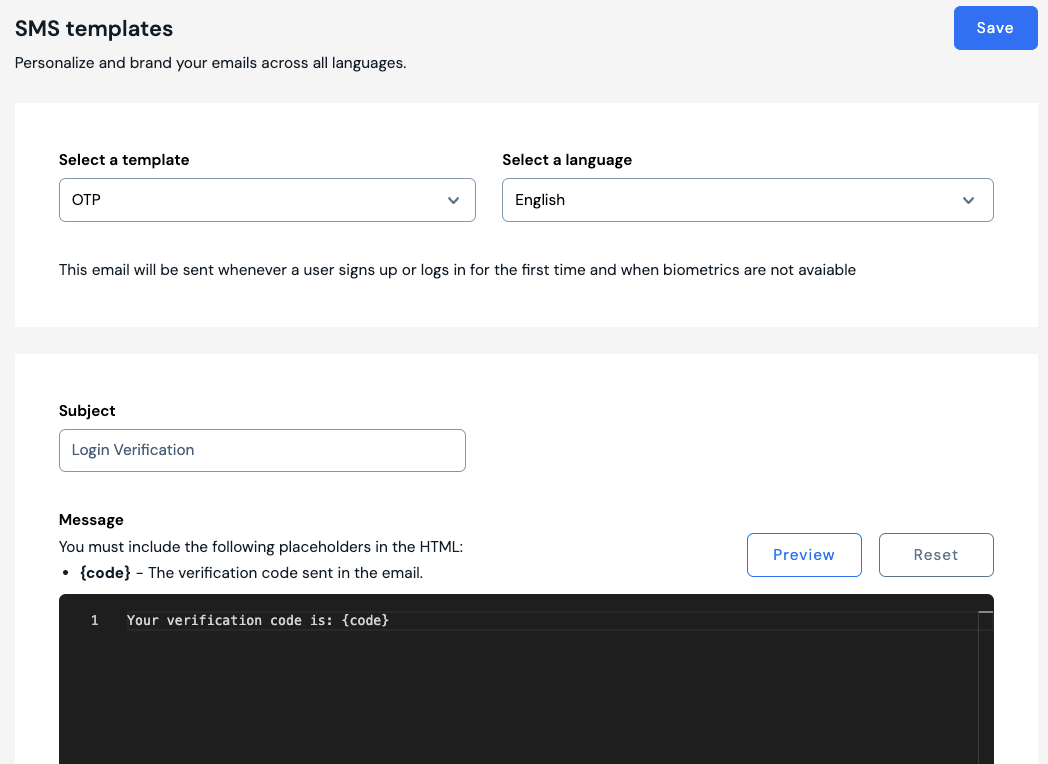 The recipient's OTP is inserted wherever you place the `{code}` token.
```text Example OTP SMS theme={null}
Your verification code is: {code}
```
Click **Preview** to check what recipients will see in the SMS message. Click **Reset** to start over with the default text.
Click **Save** to enable your new template.
## Best Practices
1. Keep the message short and direct so it fits comfortably in a single SMS segment.
2. Include the `{code}` token exactly once and make the purpose of the code clear.
3. Avoid links or extra marketing content in OTP messages.
4. Localize the message for each language your app supports.
5. Tell users to ignore the message if they did not request the code.
The recipient's OTP is inserted wherever you place the `{code}` token.
```text Example OTP SMS theme={null}
Your verification code is: {code}
```
Click **Preview** to check what recipients will see in the SMS message. Click **Reset** to start over with the default text.
Click **Save** to enable your new template.
## Best Practices
1. Keep the message short and direct so it fits comfortably in a single SMS segment.
2. Include the `{code}` token exactly once and make the purpose of the code clear.
3. Avoid links or extra marketing content in OTP messages.
4. Localize the message for each language your app supports.
5. Tell users to ignore the message if they did not request the code.