> ## Documentation Index
> Fetch the complete documentation index at: https://docs.ownid.com/llms.txt
> Use this file to discover all available pages before exploring further.
# Configuring Twilio SMS Provider
> Send phone verification messages through Twilio.
Enter your Twilio credentials to enable OwnID to send OTP verification messages to users by SMS.
## Configuring Twilio
You configure Twilio uniquely for each of your apps.
To get started, go to the OwnID console and login to your account.
1. From the Apps page, click the app you want to configure for SMS verification.
2. Click the **User journey** link from the navigation panel.  3. In **Login identifier**, select **Phone number**. Click **Customize list of countries** if you need to control which phone number country codes users can select.
4. In the **OTP configuration** panel, select **SMS** under Delivery Channel.
5. Click the **Twilio** bar.
3. In **Login identifier**, select **Phone number**. Click **Customize list of countries** if you need to control which phone number country codes users can select.
4. In the **OTP configuration** panel, select **SMS** under Delivery Channel.
5. Click the **Twilio** bar.
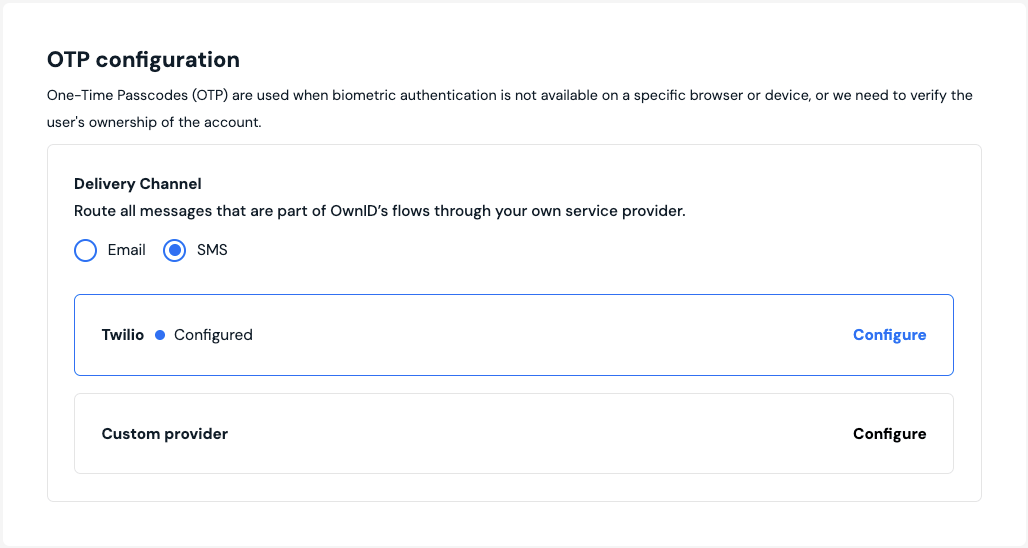 1. When the configuration form opens, enter:
* Twilio Account SID.
* Twilio Auth Token.
* Sender phone number in the **From** field.
1. When the configuration form opens, enter:
* Twilio Account SID.
* Twilio Auth Token.
* Sender phone number in the **From** field.
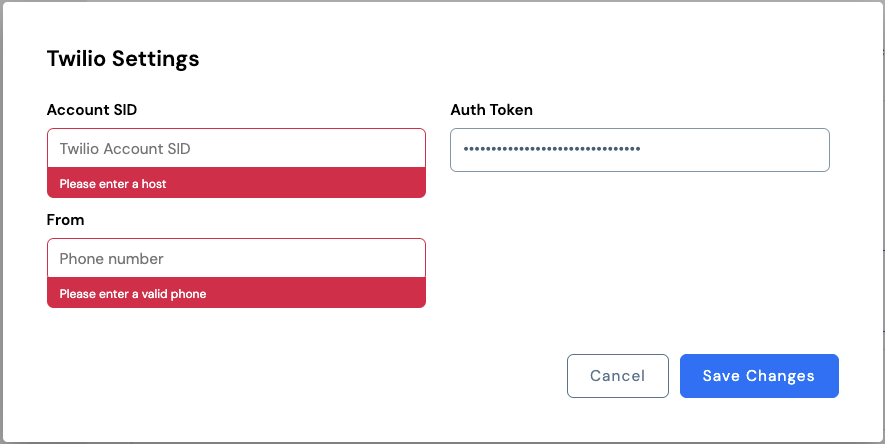 1. Click **Save Changes**.
Test your configuration by running through a login workflow with a phone number on a device without biometric verification.
Be sure to complete Twilio configuration for all your apps before deployment.
1. Click **Save Changes**.
Test your configuration by running through a login workflow with a phone number on a device without biometric verification.
Be sure to complete Twilio configuration for all your apps before deployment.