Documentation Index

Fetch the complete documentation index at: https://docs.ownid.com/llms.txt

Use this file to discover all available pages before exploring further.

This guide allows you to set up a fully functional OwnID Boost environment on your local machine. This setup includes a secure Node.js backend and a frontend that supports biometric registration and “Returning User” recognition.

Prerequisites

Ensure you have the following ready before starting:
  • Node.js installed on your machine
  • OwnID Application created via the OwnID Admin Console
  • ngrok installed (Download here)

1

Project Initialization

Run these commands in your terminal to create the project structure:
mkdir ownid-demo
cd ownid-demo
npm init -y
npm install express body-parser
mkdir public
2

The Backend (server.js)

Create a file named server.js in your root folder. This contains the Handshake Endpoints and the Security Layer.
Important: Replace YOUR_SHARED_SECRET_HERE with the secret from your OwnID Console.
server.js
const express = require('express');
const bodyParser = require('body-parser');
const path = require('path');
const crypto = require('crypto');

const app = express();
const port = 3001;

// --- CONFIGURATION ---
const OWNID_SHARED_SECRET = "YOUR_SHARED_SECRET_HERE"; 

// TUNNEL BYPASS: Ensures OwnID Cloud can reach your local server through ngrok/devtunnels
app.use((req, res, next) => {
    res.setHeader('bypass-tunnel-reminder', 'true');
    res.setHeader('X-Tunnel-Skip-Anti-Phishing-Page', 'true');
    next();
});

app.use(bodyParser.json());
app.use(express.static(path.join(__dirname, 'public')));

function hashPassword(password) {
    return crypto.createHash('sha256').update(password || '').digest('hex');
}

// Mock Database
let users = [{ 
    email: "test@example.com", 
    passwordHash: hashPassword("password123"), 
    firstName: "Test",
    lastName: "User",
    ownIdData: null 
}];

// SECURITY: HMAC Signature Verification
function verifyOwnIDSignature(req, res, next) {
    if (OWNID_SHARED_SECRET === "YOUR_SHARED_SECRET_HERE") return next();
    const signature = req.headers['ownid-signature'];
    const timestamp = req.headers['ownid-timestamp'];
    if (!signature || !timestamp) return res.status(401).send("Missing Headers");

    const dataToSign = JSON.stringify(req.body) + "." + timestamp;
    const generated = crypto.createHmac('sha256', Buffer.from(OWNID_SHARED_SECRET, 'base64'))
                            .update(dataToSign).digest('base64');
    
    if (generated !== signature) return res.status(401).send("Invalid Signature");
    next();
}

// --- OWNID HANDSHAKE ENDPOINTS ---

app.post('/getOwnIDDataByLoginId', verifyOwnIDSignature, (req, res) => {
    const loginId = req.body.loginId?.toLowerCase().trim();
    const user = users.find(u => u.email === loginId);
    console.log(`🔍 Handshake Fetch: ${loginId} | Found: ${!!user?.ownIdData}`);
    res.json({ ownIdData: user ? user.ownIdData : null });
});

app.post('/setOwnIDDataByLoginId', verifyOwnIDSignature, (req, res) => {
    const loginId = req.body.loginId?.toLowerCase().trim();
    const user = users.find(u => u.email === loginId);
    if (user) {
        user.ownIdData = req.body.data;
        console.log(`💾 Handshake Saved: ${loginId}`);
        return res.sendStatus(200);
    }
    res.status(404).send('Not Found');
});

app.post('/getSessionByLoginId', (req, res) => res.json({ token: "session-" + Date.now() }));

// --- APP ROUTES ---

app.post('/register', (req, res) => {
    const { email, password, firstName, lastName, ownIdData } = req.body;
    const lowerEmail = email.toLowerCase().trim();
    users = users.filter(u => u.email !== lowerEmail); // Reset if exists
    users.push({ 
        email: lowerEmail, 
        passwordHash: hashPassword(password || "123"),
        firstName: firstName || '',
        lastName: lastName || '',
        ownIdData: ownIdData || null 
    });
    console.log(`👤 Registered: ${lowerEmail}`);
    res.status(200).json({ firstName: firstName || '', lastName: lastName || '' });
});

app.post('/login', (req, res) => {
    const { email, isOwnID, password } = req.body;
    const user = users.find(u => u.email === email?.toLowerCase().trim());
    
    // Any password works for local testing
    if (user && (isOwnID || password)) {
        console.log(`✅ Login Success: ${email}`);
        return res.status(200).json({ firstName: user.firstName, lastName: user.lastName });
    }
    res.status(401).send("Fail");
});

app.get('/', (req, res) => res.sendFile(path.join(__dirname, 'public', 'login.html')));

// Landing Page Dashboard
app.get('/index.html', (req, res) => res.send(`
    <!DOCTYPE html>
    <html>
    <head>
        <title>Dashboard</title>
        <style>
            body { font-family: sans-serif; display: flex; justify-content: center; align-items: center; height: 100vh; background: #f8f9fa; }
            .card { background: white; padding: 40px; border-radius: 12px; box-shadow: 0 8px 30px rgba(0,0,0,0.05); text-align: center; }
            a { display: inline-block; margin-top: 20px; padding: 10px 20px; background: #e74c3c; color: white; text-decoration: none; border-radius: 8px; font-weight: bold; }
        </style>
    </head>
    <body>
        <div class="card">
            <h1 style="color: #28a745; margin-top: 0;">✅ Login Successful</h1>
            <h3 style="color: #333;">Welcome, <span id="user-name"></span>!</h3>
            <a href='/' onclick="localStorage.clear()">Logout</a>
        </div>
        <script>
            const fn = localStorage.getItem('firstName') || '';
            const ln = localStorage.getItem('lastName') || '';
            const fullName = (fn + ' ' + ln).trim();
            document.getElementById('user-name').innerText = fullName || 'User';
        </script>
    </body>
    </html>
`));

app.listen(port, '0.0.0.0', () => console.log(`🚀 Server running on http://localhost:${port}`));
3

The Frontend

Create these two files inside the public folder.
Replace YOUR_APP_ID with the App ID from your OwnID Console.
<!DOCTYPE html>
<html>
<body>
    <h2>Create Account</h2>
    <input type="text" id="firstName" placeholder="First Name">
    <input type="text" id="lastName" placeholder="Last Name">
    <input type="email" id="email" placeholder="Email">
    <input type="password" id="password" placeholder="Password">
    <div id="ownid-container" style="margin-bottom: 10px;"></div>
    <button id="registerBtn">Standard Register</button>
    <p><a href="/">Go to Login</a></p>

    <script>
        ((o,w,n,i,d)=>{o[i]=o[i]||(async(...a)=>((o[i].q=o[i].q||[]).push(a),{error:null,data:null})),
        (d=w.createElement("script")).src='[https://cdn.ownid.com/sdk/'+n,d.async=1,w.head.appendChild(d)](https://cdn.ownid.com/sdk/'+n,d.async=1,w.head.appendChild(d))})
        (window,document,'YOUR_APP_ID','ownid');

        function doRegister(ownIdData = null) {
            fetch('/register', {
                method: 'POST',
                headers: { 'Content-Type': 'application/json' },
                body: JSON.stringify({ 
                    firstName: document.getElementById("firstName").value,
                    lastName: document.getElementById("lastName").value,
                    email: document.getElementById("email").value,
                    password: document.getElementById("password").value,
                    ownIdData: ownIdData 
                })
            }).then(res => res.json()).then(data => {
                localStorage.setItem('firstName', data.firstName);
                localStorage.setItem('lastName', data.lastName);
                window.location.href = '/index.html';
            }).catch(() => alert("Registration failed"));
        }

        document.getElementById('registerBtn').addEventListener('click', () => doRegister());

        ownid("register", {
            loginIdField: document.getElementById("email"),
            passwordField: document.getElementById("password"),
            element: document.getElementById("ownid-container"),
            onRegister: (data) => doRegister(data.data)
        });
    </script>
</body>
</html>
4

Running Locally

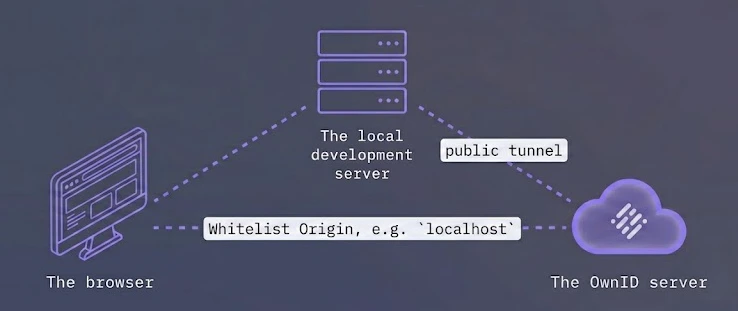
Tunnel DiagramIn the OwnID integration, the end-user accesses both OwnID and your local development server through their browser. To allow this communication, we need to:
  1. Whitelist the local origin domain (e.g., localhost)
  2. Allow the OwnID Server to reach your local development server.
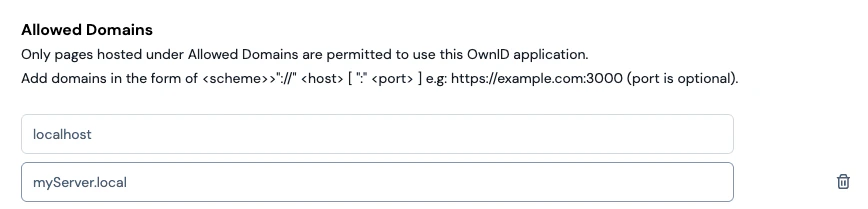
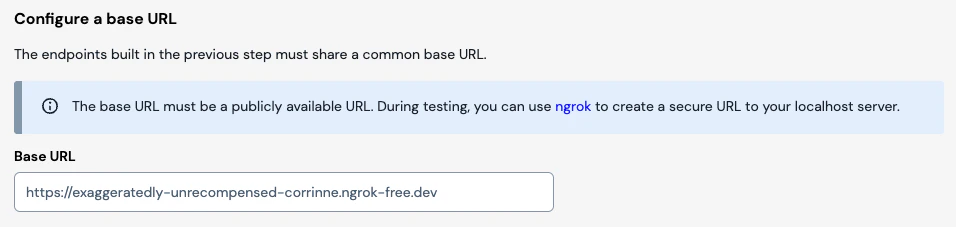
To achieve this, configure the following in your OwnID Admin Console.Navigate to the app’s main page and add the local origin to the Allowed Domains.Allowed DomainIn the app’s Integration / Backend settings, set the base URL to target a public tunnel that leads to your development server.Base Url

Creating a Local Tunnel Using ngrok

Start your local server. It will run on port 3001.
node server.js
Start ngrok, targeting your server’s port:
ngrok http 3001
5

Verify the "Returning User" Flow

  1. Open your generated ngrok URL in an Incognito/Private window.
  2. Navigate to Create account, enter a new email, and complete the biometric enrollment.
  3. You will be automatically redirected to the Login page.
  4. Type the email you just registered and click outside of the input box.
The Success: The widget will immediately switch to a Fingerprint icon. This indicates that your server successfully provided the biometric data via the Handshake.